
A Mac app for church staff and ministry leaders
Ozzie keeps watch over Sunday, so your hours go to people.
Ozzie reads your church's Planning Center, keeps watch in the background, and comes to you when something needs a decision. It lays out the facts and drafts the note. You decide, and you send it.
Free and open source to run yourself. It only reads Planning Center and never sends anything.
How it works
Hand it a job once. Ozzie keeps watch and comes to you.
Hand it a job
Ask in plain words: “Keep an eye on Sunday coverage until Sunday.” Ozzie shows a short plan: what it will watch, which accounts it reads, when it checks, when it tells you, when it stops and how to stop it sooner. Nothing starts until you say “Looks good”.
It keeps watch
Close the window and get on with your day. Ozzie checks Planning Center on schedule from the menu bar, within the limits on its plan, and keeps quiet hours.
It comes to you
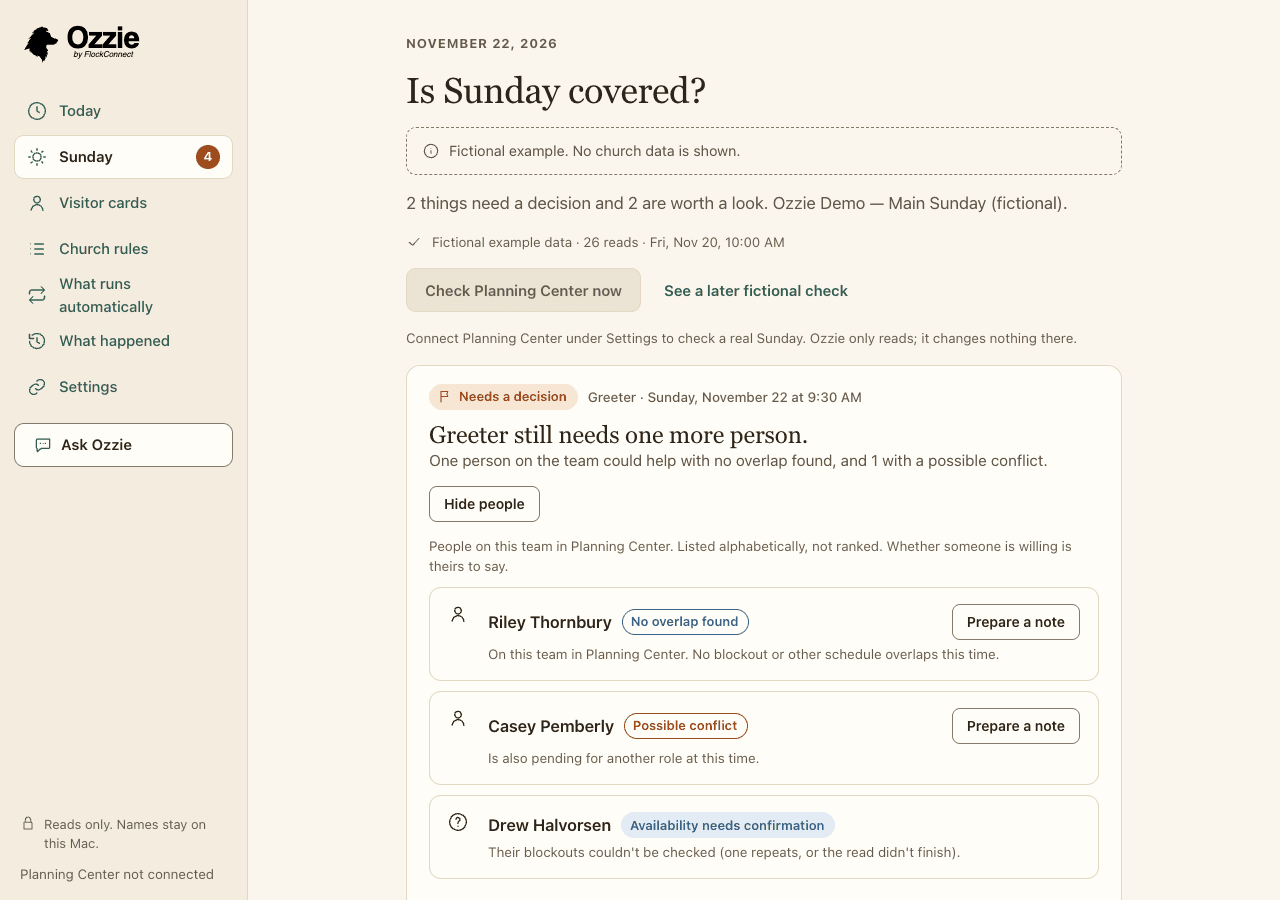
When something needs a decision, a discreet notice says so, with no names in it. Open Ozzie and the work is ready: the facts, where they came from, when they were checked, and a draft note if one would help.
What it checks
The questions behind “Is Sunday covered?”
Each finding is a fact with its source and the time it was checked. Anything uncertain is marked “Worth a look” with the reason, and Ozzie tells you what it didn't check.
Serving roles that still need someone
Which positions on Sunday's plan are still open, and who on that team could help: no overlap found, a possible conflict, or left out, with the reason for each. Nobody is ranked.
Requests waiting on an answer
People who haven't replied to a request yet, and requests that were prepared but never sent, so nobody is waiting on an email that didn't go out.
Several Sundays in a row
Who has served a number of Sundays in a row by your church's own rule, so a leader can check in. It's about care, not performance.
Rooms booked twice
Room bookings in Planning Center Calendar that overlap, including the setup time your church rules give a room.
Follow-ups with no owner
Welcome and follow-up cards in Planning Center People that have nobody assigned, so a guest doesn't fall between two desks.
Group nights that clash with serving
Planning Center Groups meetings that fall at the same time as someone's Sunday assignment.
Your church sets the rules: how many Sundays in a row is worth a check-in, which rooms can't be shared, how much setup time a room needs. Findings follow your rules, not ours.
One minute
See Ozzie in sixty seconds
A short motion piece with music and on-screen text. The app screens in it use fictional data.
What it never does
Ozzie prepares. People decide, and people go.
These aren't settings. No user, church or plan can switch them off. They live in the open source code, so they are the same whether you run Ozzie yourself or use a managed plan.
- Send a message to anyone in your church. It drafts; a person sends.
- Change anything in Planning Center. It only reads.
- Write a sermon, devotional or pastoral teaching.
- Pretend to offer pastoral care, counselling, prayer or presence.
- Score, rank or label a person, their faithfulness or their spiritual health.
- Make a pastoral decision, or act without a named person approving that exact step.
- Send the names it read from Planning Center to an AI model.
- Present a guess as a fact. Anything uncertain is marked “Worth a look”, with the reason.
- Hide what it read, when it read it, or what it didn't check.
- Nag, or go around you to someone else. Ignoring Ozzie is always safe.
Privacy
How names stay off AI models
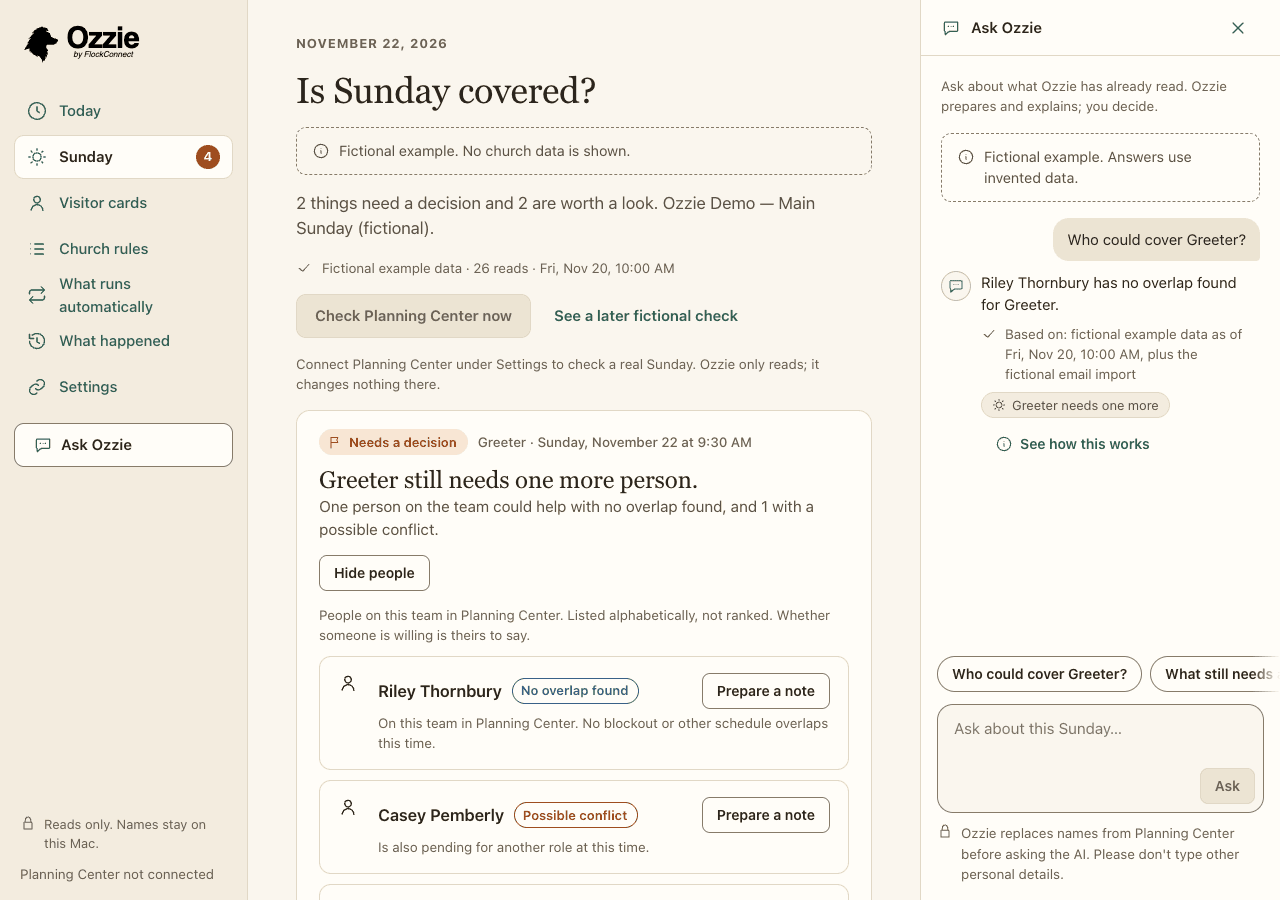
AI is optional. When you use it, to reword a draft or to ask about what Ozzie read, the AI sees placeholders instead of the names Ozzie read from Planning Center:
Hi [Volunteer A], could you serve as [Role]?
The names are put back on your Mac after the reply comes back. Before anything leaves the app, a second check refuses any request that still holds a name Ozzie has shown you, an email address or a phone number. On the managed route, every AI request requires zero data retention.
Honest limit: Ozzie can only recognise names it has read. Please don't type other people's details into a question.
Open source
Free to run yourself
Ozzie's app and every safety check are open source under the Apache-2.0 license. Read the code, build the Mac app yourself and use it with your own Planning Center account, with your own AI key, a model on your own Mac, or no AI at all.
Managed plans
Coming soon
For churches that would rather not set things up themselves: a managed AI route with zero data retention, no keys to manage, and help getting started. No prices yet, and no surprise charges when they come: an honest pause instead of overage.
Waitlist
Hear when managed plans open
Leave your email and we'll write when managed Ozzie plans are ready. That's the only thing we'll use it for. No tracking on this site, and you can ask us to remove your email at any time.
Questions
Frequently asked questions
Does Ozzie change anything in Planning Center?
No. Ozzie only reads. It makes a fixed list of read requests to Planning Center and has no way to schedule, edit, accept, decline or delete anything there. Changes stay with the people who make them today.
Does Ozzie send messages to our volunteers?
No. When a note would help, Ozzie drafts it. You read it, change it if you like, copy it and send it yourself from your own email or phone. Ozzie has no way to send a message to anyone.
Does the AI see our people's names?
The AI sees placeholders such as [Volunteer A] instead of the names Ozzie read from Planning Center, and the names are put back on your Mac. A second check in the app refuses any request that still holds a name Ozzie has shown you, an email address or a phone number. Ozzie can only recognise names it has read, so please don't type other people's details into a question.
Do we have to use AI at all?
No. Every check and every draft works without AI. AI is optional help with wording and with answering questions about what Ozzie read. You can use your own AI provider, a model running on your own Mac, or, when managed plans open, a managed route that requires zero data retention.
Does Ozzie rank or score volunteers?
No. When a role needs someone, Ozzie lists the people on that team in alphabetical order with the reason for each: no overlap found, a possible conflict, or left out and why. Whether someone is willing is theirs to say. Ozzie never scores, ranks or labels a person.
Does Ozzie keep watch when my Mac is off?
Not yet. Ozzie runs on your Mac. It keeps watch while your Mac is awake and Ozzie is running, including with its window closed, and it tells you about checks it missed while the Mac was asleep. Checks that run when your Mac is off are planned for the managed service later.
What does Ozzie cost?
Ozzie is free and open source to run yourself. Managed plans are coming and we have not set prices yet. Join the waitlist and we'll tell you when they open.
Which computers does Ozzie run on?
Ozzie is a Mac app for Apple Silicon Macs running macOS 14 or later. It is an early build: you build it from the open source code, and it is not yet signed by Apple.
Is Ozzie made by Planning Center?
No. Ozzie is an independent app by FlockConnect that reads your church's Planning Center account with your permission. It is not affiliated with or endorsed by Planning Center.
Why “table work”? In Acts 6, practical work was handed to trustworthy people so that prayer and the Word stayed first. Ozzie takes on a church's computer table work in that spirit, and leaves the people work to people.